


Tasks Beta
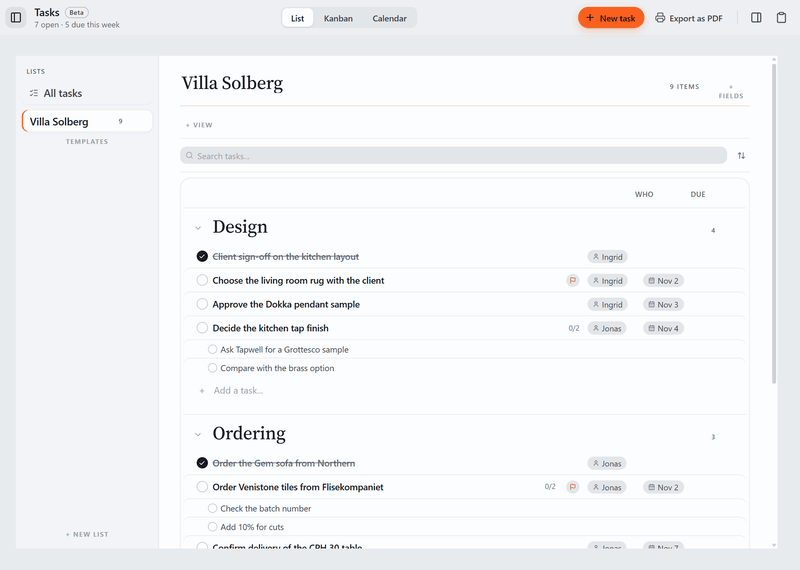
Task lists for the project, with due dates and subtasks. The most urgent ones also show on your Desk.
What it does today
- Make as many lists as you need, start one from a template such as a shopping list or project tracker, and add your own fields for dates, status, people or numbers.
- Give a task a due date, a priority, the name of who is doing it, subtasks and notes, and see the list as rows, as columns on a board, or on a calendar.
- Link a task to an item in the Schedule, and see the most urgent tasks from your other projects on the Desk.
With the spec sheet
The to-dos that come out of the sheet.
Chase a quote, confirm a lead time, order samples. Keep those jobs in the same project as the products they are about.
About the spec sheetOther tools
- Board
Moodboards for each room, with images and products from the spec sheet.
- Plans
Drawings with product pins and quantities.
- Versions
A grid of renders and drawings, with a status and price for each version.
- Permits
Building applications: forms, markup and deadlines. Deadlines also show on the Desk.
- Schedule
A timeline of phases, deliveries and deadlines.
Tasks comes with Tinn.
Free like everything else. Download Tinn, then switch Tasks on in Settings, Tools.