


Versions Beta
A grid for rounds of renders and drawings: what each version looks like, where it stands, and who made it.
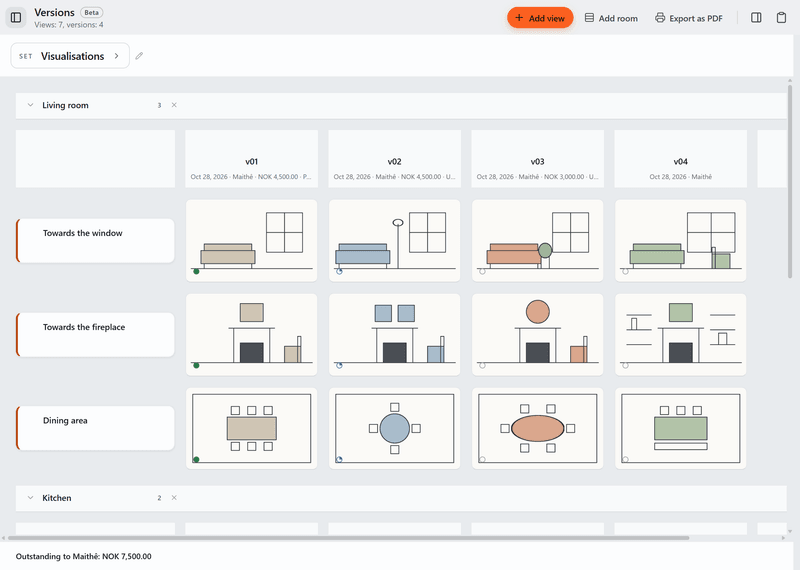
What it does today
- Make a grid for each set of work, such as renders or drawings, with views down the side and versions across the top.
- Drop an image or PDF into each cell, give it a status such as Sent or Approved, and note who made each version, what it costs and whether it is paid.
- Print an overview of what was delivered, a full-size page for one version, or a statement of what is still owed to one collaborator.
With the spec sheet
Every round, in the project file.
Versions sits in the same project as the spec sheet. When a new round of renders comes in, drop it in next to the last one, and show a row from Versions on a board.
About the spec sheetOther tools
- Board
Moodboards for each room, with images and products from the spec sheet.
- Plans
Drawings with product pins and quantities.
- Permits
Building applications: forms, markup and deadlines. Deadlines also show on the Desk.
- Tasks
Task lists for the project. Your tasks also show on the Desk.
- Schedule
A timeline of phases, deliveries and deadlines.
Versions comes with Tinn.
Free like everything else. Download Tinn, then switch Versions on in Settings, Tools.